Monday, August 6, 2018

Every Advanced Google Search Operator You Need to Know

Every Advanced Google Search Operator You Need to KnowWhen it comes to SEO, there are many tools that can help you research opportunities. Tools of the trade can run the gamut from link research to on-page optimization to tools for performing SEO audits.
Advanced Google search operators have their place in this ecosystem of tools, however. These operators can help you gain insight into SEO opportunities and audit points you otherwise would not have identified as a result; the possibilities are endless.
After we talk about the advanced operators and search commands, I will also provide several examples of how these operators can be used in the real world. From content research to technical SEO audits, these examples will help you become more familiar with how Google’s advanced search commands and operators work in real-world situations.
Advanced Search Operators

Advanced Google Search Operators

Here are the advanced Google search commands and operators you need to know.

Cache

Using the cache operator, you can find out what the most recent cache of a specified webpage is. This is useful for identifying when a page was last crawled.

Allintext

This operator will help you find whether all the terms that you are looking for shows up in the text of that page. This operator, however, isn’t pin-accurate because it won’t look for text on the page that appears close together.

Google Adds a Breathing Exercise to Search Results

Google Adds a Breathing Exercise to Search Results
A new easter egg has been found in Google search results, which guides users through a 1-minute breathing exercise.
This feature appears when terms such as “breathing exercise” and “deep breathing” are searched for.
The exercise encourages the user to breathe slowly in and out for one minute while being mindful of the breath.
See what it’s like in the screenshots below.
At the top right-hand corner, there is a share button you can use to send the exercise to someone else. Could be a subtle way of telling them to chill out for a minute.

Facebook Updates Ad Manager App With New Creative Tools

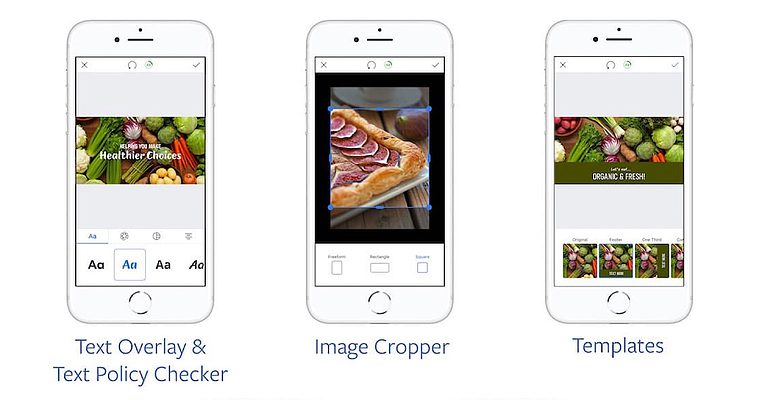
Facebook Updates Ad Manager App With New Creative ToolsFacebook has updated the Ads Manager app with a suite of creative tools, allowing advertisers to build ad content from a mobile device.
The Ads Manager app, introduced in 2015, is a mobile solution for creating and monitoring ads.
Until now, image-based content for Facebook ads had to be created outside of the Ads Manager app. Advertisers would then have to save the image to their phone and upload it to Ads Manager.
With this update, Ads Manager is a step closer to being an all-in-one mobile solution for Facebook advertisers.
Advertisers can now edit ad images, and create the advertisement itself, directly from the Ads Manager app.

Twitter Reveals How it Ranks Tweets in Search Results

Twitter Reveals How it Ranks Tweets in Search ResultsTwitter has addressed recent accusations regarding shadow banning accounts by explaining how it ranks tweets in search results.
Those who are not familiar with the term “shadow ban” may not understand how it has anything to do with search results. So let’s get everyone up to speed with shadow banning.
Here is how Twitter defines it:
“Deliberately making someone’s content undiscoverable to everyone except the person who posted it, unbeknownst to the original poster.”
Shadow banning is a method of dealing with problematic users which has been made popular by Reddit.
Twitter, however, does not deal with people this way.
“We do not shadow ban. You are always able to see the tweets from accounts you follow… And we certainly don’t shadow ban based on political viewpoints or ideology.”
Unlike Twitter’s timeline, which is displayed in reverse chronological order, its search results are algorithmically generated.

Delivering optimized media-rich content for mobile

How to deliver visually rich user experiences on mobile without dragging down page performance.

We all know the adage, “A picture is worth a thousand words,” meaning that a complex idea can be conveyed in just one image. The phrase was made popular nearly 100 years ago in an article about the power of images in advertisements, and the sentiment rings just as true in today’s always-on digital age. It’s been said that the human brain processes visual information 60,000 times faster than text, and research supports that images directly impact mood and invoke a variety of emotions.
This makes visual media, both images and video, a powerful tool full of marketing potential. According to YouAppi’s CMO Mobile Marketing Guide, 85 percent of digital marketers plan to boost their mobile marketing budget for videos in 2018 by 10 percent over 2017 levels. That’s to meet a marked surge of interest in videos, which are a superb medium for personalization and connections.

During an interview in 2017, Pinterest CEO Ben Silberman said, “A lot of the future of search is going to be about pictures instead of keywords.” We aren’t quite there yet, but the visual web has changed the game. All signs point to continued growth in the use of media-rich content to engage digital consumers.

Mobile is king

Mobile reigns supreme in today’s digital world. More than half of the time we spend each day with digital media is done with our mobile devices, and 80 percent of all shoppers make purchases via smartphones, logging billions of transactions and revenue every month.
By 2019, mobile advertising is forecasted to represent 72 percent of all US online ads. Notably, smartphone owners often search while on mobile devices and are five times more likely to leave a mobile-unfriendly site. If you aren’t providing the best mobile experience possible, you are likely losing out to your competitors that are.
If media-rich content provides a powerful vector of communication with your target consumers, and you need to reach them on their platform of choice — their mobile device — the path forward is clear.

Sunday, August 5, 2018

Bing Ads rolls out Target CPA & Maximize Conversions bidding strategies

A campaign only needs a minimum of 15 conversions within the past 30 days to be eligible for either of the new bidding strategies.

Bing Ads announced Monday that automated bidding strategies Target CPA and Maximize Conversions are now generally available for campaigns targeting Australia, Canada, France, Germany, the United Kingdom or the United States. Both strategies have been in testing for more than a year.
Maximize Conversions aims to generate as many conversions as possible within a campaign’s budget. There is also an option to set a maximum CPC (cost per click) at the campaign level, but advertisers don’t set individual ad group or keyword bids.
Target CPA aims to generate conversions at the average cost per acquisition the advertiser sets at the campaign level. With this strategy, too, advertisers can set a maximum CPC for added bidding control, and advertisers do not set or change ad group or keyword bids in a campaign using this bid strategy.
To use either of these conversion-based bidding strategies, campaigns must have at least 15 conversions within the past 30 days. As with all machine learning-powered automation, the more data to train and learn the better. Bing Ads recommends allowing the strategies to run at least two to three weeks for the system to learn and achieve the target goals.
A couple of unique features to call out:
  • Bing Ads allows advertisers to use manual bidding on individual ad groups or keywords within a campaign set to use Target CPA or Maximize Conversions by choosing the Manual bid strategy type for the ad group or keyword.
  • Advertisers can use bid modifier values between -90% and +900% with automated bidding to increase or decrease the click volume a campaign receives from the targeting option (device type, location, ad schedule or audience). A bid modifier value of -100% will still function as a way to opt out of the related targeting option. Bing notes that bid adjustments in campaigns using automated bidding do not change the CPA goal and “may cause your bids to go above your maximum CPC.”
Both Maximize Conversions and Target CPA require accounts to have Universal Event Tracking (UET) implemented on their sites for conversion tracking, and if you’re using a third-party management tool, bid adjustments made there will not apply to campaigns using either of these strategies. Bing Ads put together a handy comparison chart below to help advertisers evaluate its bid strategy options.
Bing uses a variety of signals to inform its bidding strategies such as browsing activity, operating system, search queries and ad copy. The system also makes bid adjustments in real time based on time of day or day of week, user location and device type.

The ultimate guide to using Bing Webmaster Tools — Part 1

Contributor and Bing Chief Evangelist Christi Olson kicks off a multipart series on Bing webmaster tools. If you are new to Bing’s webmaster toolset, this detailed guide will get you started and on your way to better rankings on Bing.

If you are a website owner, you’ve invested a lot of time and resources to create your site. Once it’s become active, you want everyone to see and find your site when they search on Bing.
There is no cost to be added to our search results. Bing explores the internet with a crawler to find web pages and includes them in our search index. While Bing crawls billions of pages each day, the internet is constantly growing, so our crawlers are always hard at work looking for new content to add to our index.
To help webmasters get and keep their sites on Bing, we offer our Bing Webmaster Tools (BWT), a free toolset you can use to submit your site to Bing and Cortana and also monitor the health of your site. Bing Webmaster Tools helps webmasters identify and understand any problems a site may have so that errors can be fixed and web pages can be optimized.
Starting today, we are kicking off a series of articles that will do a deep dive into Bing webmaster tools. If you are new to Bing’s webmaster toolset, this detailed guide will help you get started and on your way to better rankings on Bing.

Who should use BWT?

Anyone who owns a website or who has a vested interested in how a website performs would benefit from using Bing Webmaster Tools. This could be the business owner, their site admin, a digital marketer or website developer. Bing webmaster tools will help monitor and maintain a site’s presence on Bing.
In the decade I’ve been working in search, I have been an agency search engine optimization specialist (SEO), the in-house SEO and the paid search manager for both Microsoft Windows and Harry & David. I have worked on hundreds of local and small business websites as well. In all of the digital marketing positions I’ve had, I have used Bing’s webmaster tools as my guiding light for monitoring my organic search performance.
You don’t have to sign up for BWT to be included in the Bing search index, but the toolset will provide insights on your website’s visibility so you can optimize it to improve rankings, engage with customers, drive sales and generate leads on Bing.

Why use BWT?

Webmaster tools let you monitor and investigate the overall health of your website and shows how Bing and your customers are finding your site.
You can access in-depth reports including the search queries driving traffic to your site, the impression and click volume of those queries and which websites are linking to your site. You can also:
  • Monitor your website’s performance.
  • Configure how Bing crawls and indexes your site.
  • Submit your website to be crawled.
  • Remove content you don’t want to be indexed.
  • Disavow links.
  • Monitor and resolve potential malware or spam issues.
All of this information helps you understand how Bing is viewing a website and its content so you can determine if adjustments need to be made.
For example, if I have a personal website about my experiences as a mom raising a rambunctious toddler, but all of the search queries driving traffic to my site are related to recipes, I probably have an issue with the content on my site I need to address.